
Source: ServiceNow AI Academy walkthrough of AI Agent Advisor — https://www.youtube.com/watch?v=Bm5UhkUHoHU
I watched the AI Academy walkthrough of AI Agent Advisor twice. The first time I was sold on the path. The second time I started a list of what the demo overlooks. Both reactions are valid. The path is good. The example used to demonstrate the path is less convincing, and ServiceNow does not hide that. This article is about that gap, and about where AI Agent Advisor sits in the platform, what is well-designed, and where the architecture work actually starts.
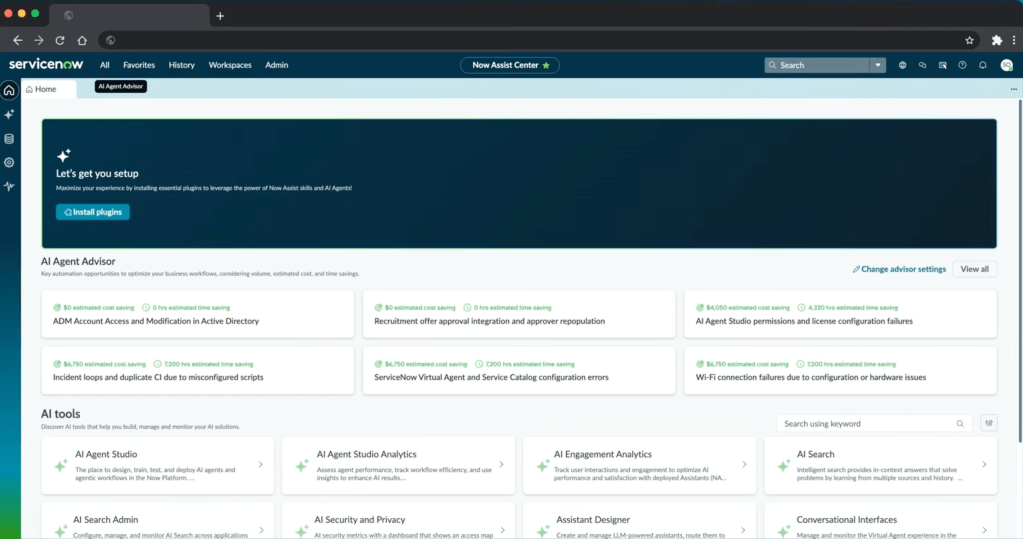
The path the demo proposes
Without the marketing, the demo describes a clean six-stage flow.
- The platform analyses resolved and closed records (incidents and CSM cases) and clusters them by topic.
- Each cluster becomes an automation opportunity, with a name, a record count, and an estimated annual saving.
- For each opportunity, the platform extracts candidate resolution steps from
work_notesandcomments. - It scans the AI Tools library (more on this label later) and matches existing tools to those steps. Steps without a matching tool are flagged as “custom tool required”.
- You push the artefact into AI Agent Studio, which auto-populates the agent definition (description, role, steps, tools).
- You run an automated evaluation of that agent against the source records to validate it before deploying. This is the stage where the demo struggles.
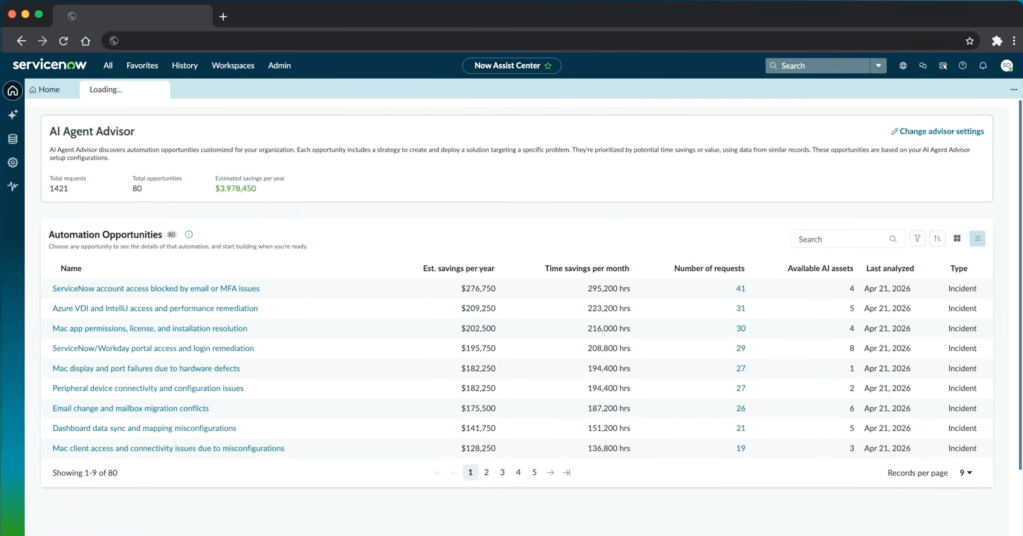
The estimated saving for the demo instance is $3,978,450 per year across 80 opportunities. That is a big number. The assumptions behind it are not shown anywhere on the page. We are supposed to take it on trust. For a figure of that size, I would have liked one or two explanatory tooltips before bringing the screenshot to my CIO.
A re-baked idea, with a new action layer
This is not a new feature. ServiceNow shipped Automation Discovery at least a year before, doing the same thing: cluster resolved incidents on short description, surface them as automation opportunities, estimate time savings as records multiplied by mean time to resolve. The screenshot below is from the Automation Discovery workspace, copyright 2024.
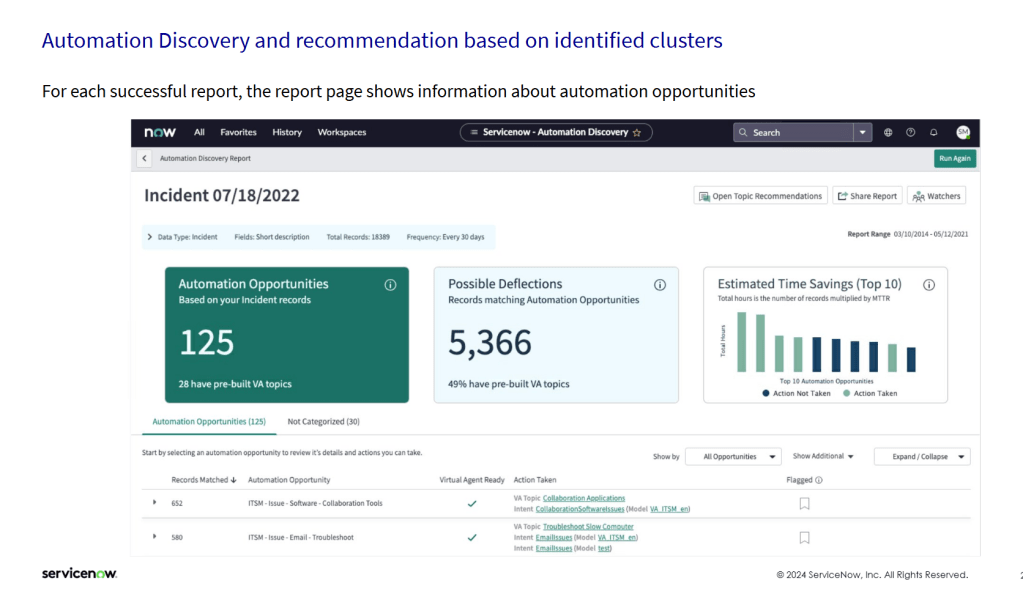
The structural difference between the two is what sits at the action end. Automation Discovery matched each cluster to a Virtual Agent topic, a deterministic chatbot script. AI Agent Advisor matches it to an AI Agent, an LLM-orchestrated multi-step flow with access to platform tools. Same clustering layer. More sophisticated action layer.
I want to point this out, because the marketing makes AI Agent Advisor look like a 2025 invention. The opportunity discovery is not new. The logic of clustering resolved incidents to surface automation candidates has existed in ServiceNow for some time. Whether AI Agent Advisor surfaces better proposals than Automation Discovery did, the demo does not show. What is new is the inference layer that turns a cluster into a deployable agent, and the ROI calculator that puts a number on it.
Where it sits in the platform
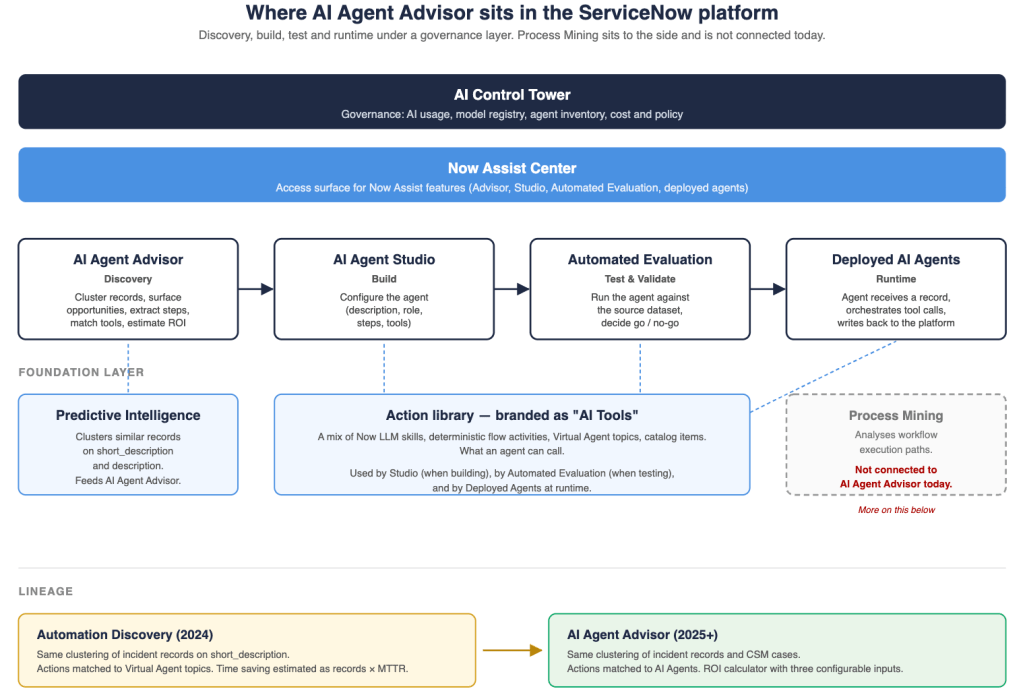
The diagram below maps the products in the order a user meets them: governance at the top, the access UI below, then the workflow stages from discovery to runtime, with the foundation layer underneath. Process Mining sits to the side because it is not connected today. I come back to that at the end of the article.
What is well-designed
Three things in the demo are genuinely good. I want to point them out before I move to the gaps.
The most useful design choice is resolution-step extraction from work_notes. Extracting candidate steps from the comments and work notes of resolved tickets is a smart use of text that already exists. Nobody was reading those notes at scale. Now an LLM does. The output is noisy. The design choice is right anyway.
The continuity also works, and it works across three stages. The artefact created in AI Agent Advisor carries forward into AI Agent Studio (description, role, steps and matched tools pre-populated), and then carries forward again into Automated Evaluation (the records that produced the opportunity become the dataset against which the agent is tested). That is a real productivity gain. It also shows a real architectural choice: a shared artefact data model across Advisor, Studio and Evaluation. That kind of model is hard to retrofit, which suggests the three were co-designed rather than developed separately and combined later.
The third strong point is automated evaluation against the source dataset itself. Testing the new agent against the same records that produced the opportunity is clever in concept. It gives a baseline for whether the agent can actually do what the cluster suggested. It also shows failure clearly, which the demo demonstrates without softening.
Where the architecture work begins
1. The “steps” are not really steps
The demo opens one of the discovered opportunities: Azure VDI and IntelliJ access and performance remediation. The opportunity is not the VDI performance problem itself. It is the recurring pattern of 18 related incidents about that problem, and the chance to address all of them with a single agent rather than 18 manual resolutions.
For that opportunity, the platform shows 18 resolution steps. The word “step” implies a sequence: do this first, then this, then this. The actual content is not a sequence. Some entries are diagnostic actions. Others are workarounds. Others are escalation paths. Their order is the order of work_notes entries, not the order of resolution.
Two things go wrong here. The first is that the LLM reads the work notes to surface possible solutions, but it has no way to assess whether a given entry is relevant, whether it is a real fix or a workaround, or whether two entries are alternatives rather than sequential steps. The platform reports them all as “steps” with no qualifier.
The second is input quality. Work notes are written by humans under time pressure. Most of the time, people do not write in detail what they actually did. The classic garbage-in, garbage-out problem applies. If the work notes are thin, the LLM does not have enough input to suggest useful solutions, and what comes out is shallow even before any human curation.
The label “steps” sets the wrong expectation. A more honest label would be “candidate actions”. As it is, configurators will spend hours per opportunity cleaning up that list. That cost is invisible in the headline ROI.
2. A labour-cost estimate, not a TCO
The Potential Value Calculator exposes three configurable inputs.
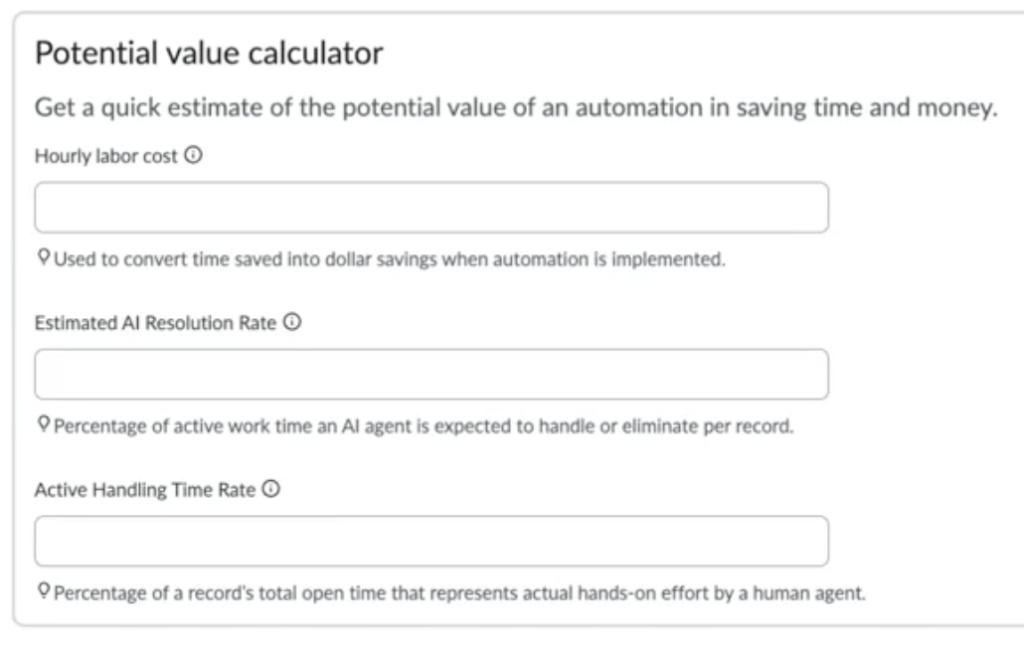
The formula is roughly: records × open time × Active Handling Time Rate × Estimated AI Resolution Rate × hourly cost. With the defaults of 15% and 25%, you keep about 3.75% of the open-time clock as labour saved. The model is internally consistent.
What is not modelled:
- Implementation cost of each AI Tool that is not yet built.
- Inference run cost per agent invocation, which matters under AI Control Tower’s token-based cost model.
- Decommission savings if an agent retires an upstream tool.
- Failure cost when the agent gets it wrong and a human has to clean up.
The dashboard label reads Estimated savings per year. Most readers will assume net. It is labour cost only. Take one of the example opportunities: $209,250 of annual saving from 31 historical records. Divide one by the other and you get $6,750 of labour cost per ticket. For that figure to be right, each ticket has to have been open and worked on for a very long time. Possible, but worth questioning. And if it really is true, you start to wonder whether the workaround the demo itself extracted from the work notes (ship every affected user a high-spec MacBook) might actually be the more cost-effective solution.
3. “AI Tools” is a stretched label
The action library that the agent can call is branded as “AI Tools”. In practice it includes Now LLM skills, Virtual Agent topics, deterministic flow activities, and catalog items. Some of these are AI in substance. Others are platform features that ServiceNow has shipped for years and that an agent can now call through a function-calling interface.
There is a valid technical meaning of “tool” in the agentic-AI sense: any function exposed to an LLM. By that definition a catalog item is a tool. The naming convention rebrands the deterministic platform as AI by association. One thing I would want to verify is how AI Control Tower accounts for this. If a non-AI flow activity is invoked through an agent, is the call counted as an AI invocation in the governance metrics? I have not confirmed this in detail. If the answer is yes, the metrics conflate token-based AI cost with platform compute cost, and the perceived AI footprint of the platform becomes bigger than the actual one.
I have written about this before. To me it feels strange. Catalog items are not AI. Routing rules are not AI. They are platform features that have shipped for a decade. They become tools that an AI agent can call, which is a useful integration. There may be a clear rationale on the ServiceNow side that I do not see. From the outside, the choice does make the AI footprint look bigger than I think it actually is.
4. Workaround contamination in the agent’s training
The VDI example produced ten resolution steps. Step 4 reads: “Provide or ship a high-spec MacBook with at least 32 GB RAM if required.”
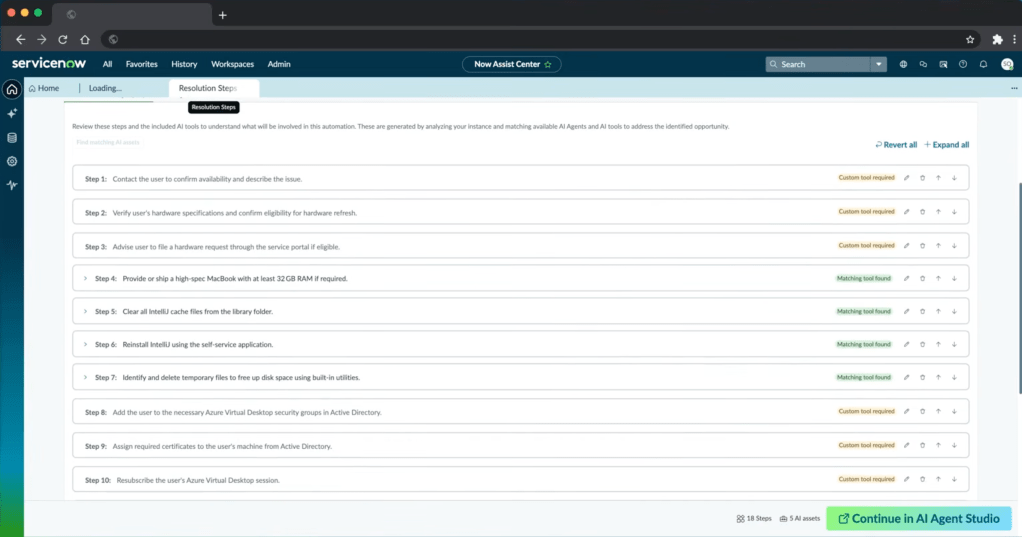
That entry is in the candidate action set because some past tickets were closed by giving a MacBook to the user. The work notes captured it. The extraction picked it up as a step. If this set is pushed into AI Agent Studio without curation, the resulting agent will treat “ship a MacBook” as a valid resolution path. Run that across the incident pipeline and a significant percentage of VDI users will be issued a MacBook. The hardware budget will pay for it.
Two effects are at work here. The first is survivorship bias: only resolved or closed incidents feed the cluster, and the unresolved or escalated ones drop out of the training set. That is exactly where the agent is most likely to be tested in production. The second is workaround contamination: the platform cannot tell a fix from a workaround, so a “we bought a MacBook” entry is treated as equivalent to a real resolution.
Filtering for this is a human job. There is no automated cue that a step is a workaround rather than a fix.
5. The demo’s own evaluation: “Do not deploy”
At the end of the walkthrough, the auto-generated VDI agent is tested against five source records. The result page is unambiguous.
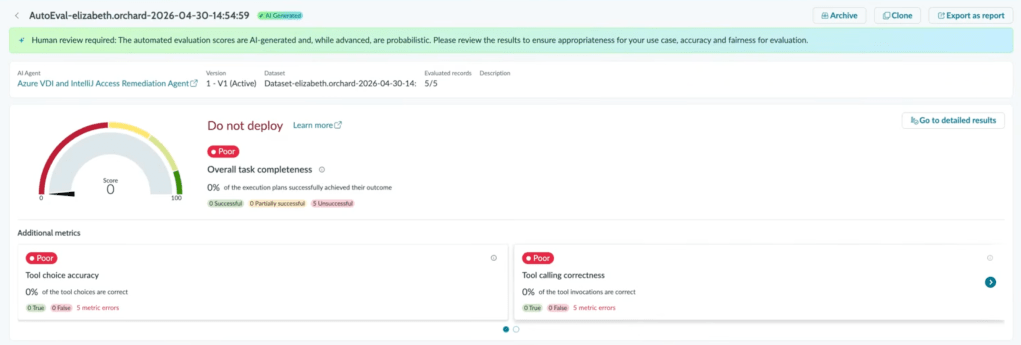
ServiceNow does not soften this. The narrator notes that the configurator did not add all the necessary tools, which is exactly the point. The gap between “the platform suggested this opportunity” and “the agent works” is the configuration work in between. That work is significant.
This is the article’s central evidence in one screen. The path the platform proposes is right. The deployable agent at the end of that path needs an architect, and for now it needs a human in the loop.
An open question on process mining
The discovery layer in AI Agent Advisor is a clustering engine on record text. ServiceNow also has Process Mining, which analyses workflow execution paths to find variants, looping and time-in-state outliers. The two products look at different things. AI Agent Advisor finds what kinds of incidents repeat. Process Mining finds where in the workflow people get stuck.
I initially wondered why Process Mining is not part of AI Agent Advisor. Thinking about scope makes the answer clear. Incidents and CSM cases do not follow a predefined deterministic workflow. They are raised and classified, but the resolution path is not modelled in advance. Process Mining needs a structured process to analyse. An open-ended incident does not give it one.
Where Process Mining would actually fit is on the other side of the platform: catalog requests, change requests, request fulfilment, anything with a predefined deterministic flow. Today AI Agent Advisor is limited to incidents and CSM cases, so the question does not arise. The moment AI Agent Advisor is extended to requests or changes, the case for adding a Process Mining input becomes much stronger. Process Mining could surface a different class of opportunity: a workflow that is inefficient because it is too deterministic and too complex, where an agentic flow could work around that complexity. That is the architectural step I would watch for next.
Where this leaves the architect
This demo ships the vision and the tooling that ServiceNow has built so far. What is interesting for people in my role is not whether the example agent works perfectly today. The interesting part is the view it gives on how the work of a ServiceNow architect is shifting.
The path from data to deployed agent now exists inside the platform. The stages are there: discovery, build, test, deploy. The artefact carries through. The evaluation closes the loop. What is missing from the demo is everything an architect knows how to do at each stage: clean up the candidate actions, validate the tool inventory, build a real TCO, filter survivorship and workaround bias from the training set, decide what Do not deploy means in a real production environment.
That is the shift. AI Agent Advisor opens architects to a transition in our work: less about configuring static workflows, more about curating the inputs and validating the outputs of agentic ones. For now, this remains human-in-the-loop work. I find the vision promising. I find the gap between the vision and a deployable agent even more interesting, because that gap is where I expect to spend a good part of my time over the next few years.



Leave a comment